
Inventory problems have a bad habit of looking simple from a distance.
An item keeps stocking out? Increase the safety stock.
Inventory is piling up? Lower the reorder point.
Purchasing keeps overriding the system? Maybe the buyers just know better.
Sometimes one of those answers is right. Sometimes it treats the symptoms instead of the cause.
Safety stock and reorder point are basic replenishment tools, but the math is only part of the story.
The real challenge is the quality of the inputs: demand history, supplier lead times, variability, service expectations, purchasing constraints, warehouse activity, and whether the inventory data can be trusted.
At the simplest level:
Safety stock is inventory held as protection against uncertainty.
The reorder point is the inventory level that tells the business when replenishment should begin.
A basic relationship looks like this:
Reorder point = expected demand during replenishment lead time + safety stock
Simple enough.
Until you have 8,000 SKUs, three warehouses, suppliers that treat lead time as a suggestion, and a spreadsheet called Inventory_Final_v7_REAL.xlsx.
That is where inventory policy starts getting interesting.
This guide looks at how safety stock and reorder points work together, where the settings commonly go wrong, and what distributors should review before changing or automating replenishment rules.
Safety stock vs. reorder point at a glance
| Safety stock | Reorder point | |
| Purpose | Provides a buffer against uncertainty | Tells the business when replenishment should begin |
| Main question | How much protection do we need? | When should we replenish it? |
| Usually influenced by | Demand variability, lead time variability, service expectations, item behaviour | Expected demand during lead time plus the safety stock policy |
| Does it tell you how much to order? | No | Not by itself |
| If set too low | The business has less protection when reality differs from plan | Replenishment may begin too late |
| If set too high | More cash and warehouse space can be tied up in inventory | Replenishment may start earlier than necessary |
| Relationship | Usually forms part of the reorder point calculation | Usually includes expected lead time demand plus safety stock |
Acumatica’s current inventory documentation defines safety stock as extra inventory maintained to help prevent stockouts and a reorder point as the stock level that prompts replenishment.
It also states that the reorder point should account for anticipated demand during lead time plus safety stock. (Acumatica documentation)
Oracle describes reorder point planning using the same underlying relationship: safety stock plus forecast demand during replenishment lead time. (Oracle documentation)
The cleanest way to remember it is this:
Safety stock is the cushion. The reorder point is the alarm.
The alarm should go off early enough that normal demand can continue while the next shipment is on its way, with the cushion still there if something goes sideways.
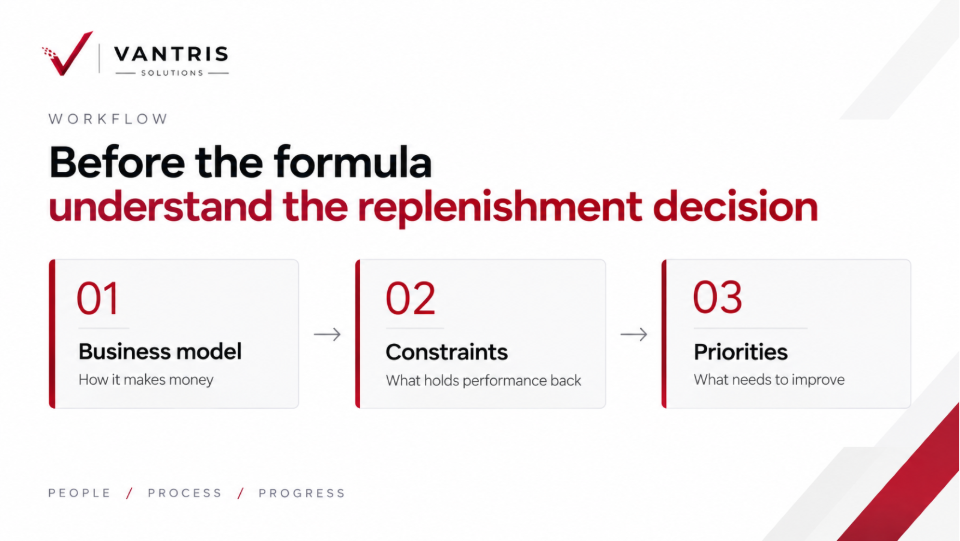
Before the formula, understand the replenishment decision
A better ERP decision starts with the business.
Specifically, with how it makes money, where performance is being held back, and what needs to improve before deciding what role technology should play. Inventory replenishment deserves the same discipline.
It is tempting to start inside the ERP because that is where the fields live: safety stock, reorder point, maximum quantity, lead time, replenishment method.
They did not solve the problem for you.
Those fields record a policy. They do not create a good one.
Before entering numbers, the business needs to decide what behavior it wants from the inventory. A predictable replacement part, a long-lead imported product, and a slow-moving item that is critical to one major customer should not automatically follow the same rule.
And sometimes the problem is not the replenishment setting at all. If inventory records are wrong, lead times are stale, demand history is distorted, or buyers do not trust the system; a better formula will not fix the process.
An ERP system is perfectly capable of being confidently wrong. Give it bad assumptions and it will apply them at scale.
What is safety stock?
Safety stock is an extra inventory held to protect the business when actual conditions differ from expected conditions.
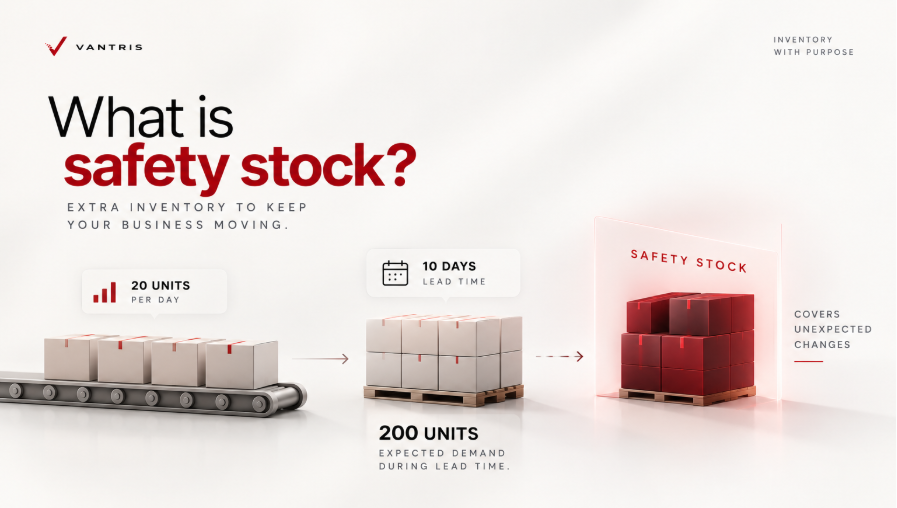
Imagine a distributor that sells about 20 units of an item per day and normally waits 10 days for replenishment.
That means expected demand during lead time is about 200 units.
If demand stayed perfectly steady and the supplier always delivered on time, safety stock would be easy to think about. Real distribution is rarely that cooperative. A large customer places an unexpected order. A supplier misses the date. The container is delayed. Receiving falls behind. Demand changes while the purchase order is already in transit.
Safety stock is there to absorb some of that uncertainty.
That is why calling it simply “extra inventory” is not very useful. The better question is:
What uncertainty are we trying to protect against?
Two items can have similar sales volumes and very different risks. One may have steady demand and a reliable domestic supplier. Another may sell in bursts and depend on a supplier with inconsistent lead times.
Using the same safety stock rule for both may be simple to administer, but simple and correct are not always the same thing.
What is the reorder point?
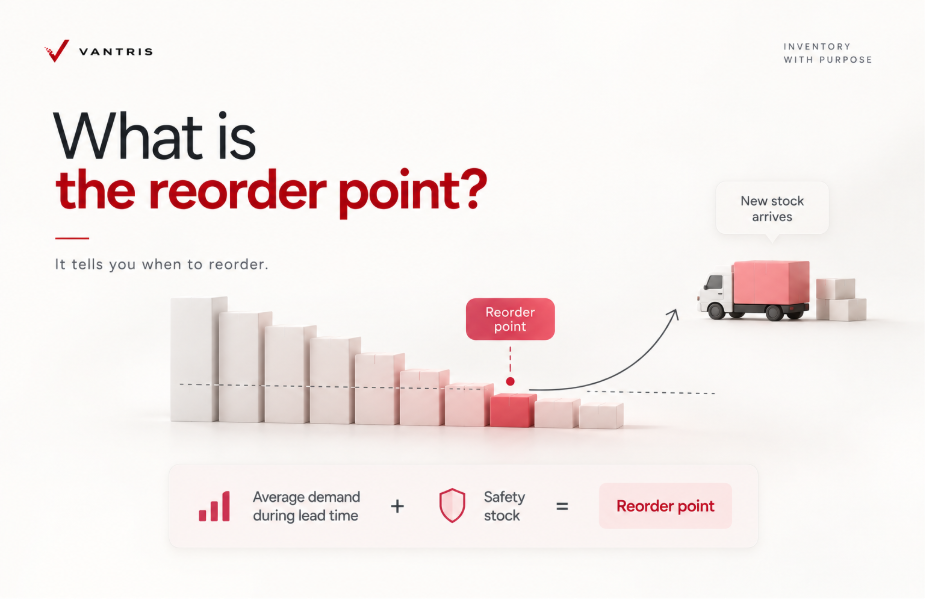
A reorder point determines when the replenishment process should begin.
A basic version is:
Reorder point = average demand during lead time + safety stock
Suppose average daily demand is 25 units and replenishment takes 12 days.
Expected demand during the replenishment period is:
25 x 12 = 300 units
If the business wants another 80 units of safety stock:
300 + 80 = 380 units
The reorder point is therefore 380 units.
When the inventory measure used by the replenishment process reaches the threshold, replenishment should be triggered according to the business rule.
One detail matters here.
The number being evaluated is not always “what is physically on the shelf right now.”
Depending on the ERP and planning setup, the calculation may also consider available inventory, allocations, open demand, planned receipts, or other supply records. Oracle’s reorder point planning documentation, for example, includes on-hand inventory and planned receipts when evaluating available quantity against the replenishment threshold. (Oracle documentation)
So before comparing a reorder point to a warehouse count and deciding if the system is wrong, check what the ERP is using in the calculation. Sometimes the disagreement is not the number. It is the definition behind the number.
Safety stock and reorder point work together
The relationship makes more sense if you picture inventory falling while a distributor waits for new supply.
The reorder point needs to trigger enough stock left to cover normal expected demand during lead time. Safety stock sits underneath that expected demand for protection.
| Replenishment input | Example value |
| Average daily demand | 25 units |
| Lead time | 12 days |
| Expected demand during lead time | 300 units |
| Safety stock | 80 units |
| Reorder point | 380 units |
The business does not wait until inventory reaches 80 units before ordering.
If it did, the safety stock would effectively become the trigger, while the expected 300 units of demand during lead time would have been forgotten.
The supplier is unlikely to speed up simply because somebody forgot that customers keep ordering while the purchase order is travelling.
That is the basic logic behind the formula.
The more interesting question is whether 25 units of daily demand, 12 days of lead time, and 80 units of safety stock are good assumptions.
That is where inventory planning becomes a business problem rather than an arithmetic exercise.
Average demand can tell the truth and still mislead you
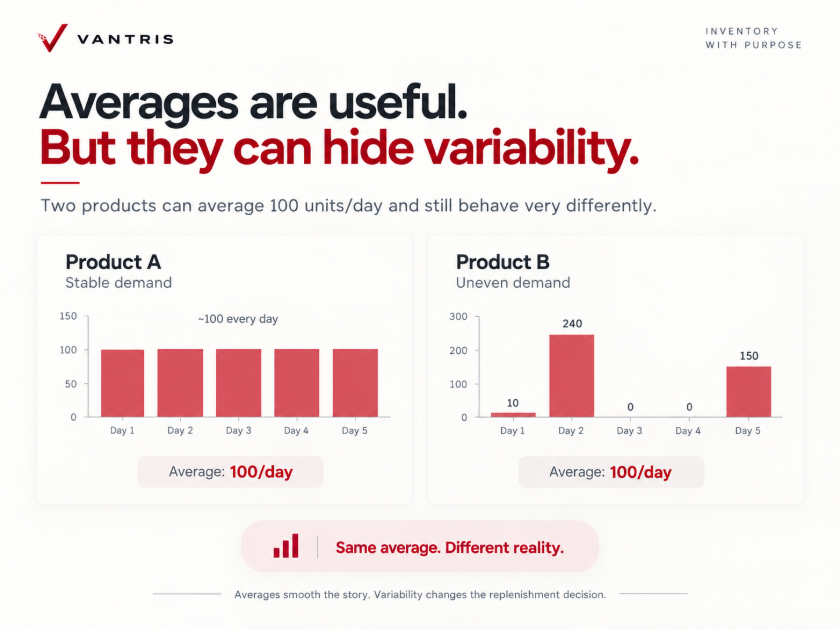
Averages are useful.
They are also very good at making messy things look well-behaved.
Imagine two products.
- Product A sells almost 100 units every day.
- Product B sells 10 units today, 240 tomorrow, nothing for two days, then 150 after a large customer order.
Over a long enough period, both products might average 100 units per day.
Operationally, they are not the same product.
This is why demanding history needs context.
Seasonality matters. Promotions matter. Large account behaviour matters. Product launches and phase outs matter. Growth matters. Customer concentration matters.
And stockouts matter more than people sometimes realize.
Suppose the business sold only 600 units last month because the product was unavailable for a week.
The sales history says 600. Customers may have wanted 800.
If the replenishment calculation learns only from what was shipped, the previous shortage can become part of the logic that creates the next shortage.
That is an ugly little loop.
Recorded sales are evidence. They are not always the entire demand story.
This is also where inventory accuracy and inventory visibility start connecting directly to replenishment. A company can have sophisticated planning logic and still make poor decisions when the underlying inventory or demand of information is incomplete, delayed, or difficult to use.
Lead time deserves more respect than it usually gets
Lead time often appears in an item record as one harmless little number.
“10 days.”
Very clean.
Where did the 10 come from?
That question can become awkward surprisingly quickly.
Maybe it is the supplier’s quoted lead time. Maybe it came from the previous ERP system. Maybe purchasing entered six years ago. Maybe everyone knows the supplier really takes closer to three weeks, but nobody ever changed the field. Maybe the supplier usually takes ten days, except during its busiest season.
The number should represent the replenishment reality the business is planning around.
That may include supplier processing, transportation, customs, receiving, inspection, or internal handling before the product becomes usable in inventory.
Variability matters, too.
A supplier that delivers in ten days almost every time behaves very differently from a supplier that takes anywhere from five to twenty days while still averaging ten.
Same average. Very different planning risks.
Acumatica’s current replenishment parameter functionality reflects this distinction. The 2026 R1 application exposes both average lead time and lead time standard deviation, alongside daily demand forecast and forecast error. (Acumatica replenishment parameters)
The software can calculate those inputs.
The business still needs to make sure the inputs deserve to be believed.
Safety stock is really a decision about service and risk
There is no magical safety stock number floating somewhere in the warehouse waiting to be discovered.
The business is making a tradeoff.
More protection can reduce exposure to shortages. More protection can also mean more cash sitting in inventory.
The right tradeoff can vary dramatically by item.
Consider two examples.
- The first is an expensive product with irregular demand and reasonable alternatives available to customers.
- The second is an inexpensive component that frequently completes much larger customer orders.
A stockout of the second item may cause more commercial pain even though the item itself is worth far less.
Unit cost alone does not tell you the cost of being unavailable.
This is why service level enters more sophisticated replenishment approaches.
Acumatica 2026 R1, for example, supports warehouse level service levels and can calculate suggested safety stock using forecast information and the selected service level. (Acumatica replenishment parameters)
That does not mean every distributor should chase the highest possible service level.
Perfect availability has a price.
The useful conversation is about which products deserve which level of protection and why.
Reorder point is not order quantity
This distinction saves a lot of confusion.
A reorder point tells the business when replenishment should begin. It does not necessarily tell the business how much to order.
Those are separate decisions.
A distributor may also be dealing with maximum quantities, minimum purchase quantities, pack sizes, economic order quantities, container quantities, purchasing commitments, shelf life, warehouse capacity, and vendor requirements.
A reorder point tells you when to replenish inventory. It does not necessarily tell you how much to order.
If an item has a reorder point of 380 units, reaching 380 does not automatically mean “buy 380.”
The order quantity depends on the replenishment method. Under a Min./Max. approach, the system may order enough to bring inventory back toward a defined maximum. Under a Fixed Reorder Quantity method, the purchase quantity comes from a separate setting.
Acumatica, for example, supports both Min./Max. and Fixed Reorder Qty. replenishment methods. Under Min./Max., the reorder point acts as the minimum, and replenishment is calculated toward the maximum. (Acumatica Stock Items)
This distinction matters when troubleshooting excess inventory.
If stock levels are consistently too high, the reorder point may not be the problem. The order quantity may be too large, the maximum may be outdated, the supplier MOQ may have changed, demand may have slowed, or purchasing may be ordering beyond the ERP recommendation to capture a price break.
Before lowering the reorder point, check whether the problem is the trigger or the quantity being ordered.
Not every SKU deserves the same inventory rule
A common replenishment shortcut is to create a rule that works reasonably well and rolls it across everything.
That is understandable.
It is also how exceptions quietly become normal operations.
A distributor may carry fast movers, slow movers, seasonal products, imported products, locally sourced items, high value products, low value essentials, private label products, spare parts, new products, and products heading toward retirement.
They should not automatically inherit identical assumptions.
A useful replenishment of policy groups for products according to the characteristics that actually affect the decision.
| Item characteristic | Why it can affect replenishment |
| Stable, frequent demand | Demand may be easier to forecast |
| Highly variable demand | More uncertainty may need to be considered |
| Long supplier lead time | The business must plan further ahead |
| Unreliable supplier lead time | Additional supply uncertainty enters the decision |
| High item value | Excess inventory may have a larger working capital impact |
| High stockout impact | Availability may deserve greater protection |
| Seasonal demand | Static year round parameters may age badly |
| New item | Historical demand may provide little guidance |
| End of life item | Replenishment needs to avoid creating obsolete stock |
| Large MOQ or case pack | Purchasing constraints can dominate the calculated requirement |
The point is not to create twenty-seven inventory policies because somebody discovered a new dropdown menu.
Complexity has a cost too.
The goal is enough segmentation to reflect meaningful operational differences without creating rules nobody can maintain.
Multi location distribution changes the question
Once inventory is spread across multiple warehouses, the same replenishment settings may not work everywhere.
Suppose an item is stocked in Calgary and Toronto. Toronto sells more of it. Calgary has slower demand but a longer replenishment path. One location buys directly from the supplier, while the other is replenished through a distribution centre.
That changes math.
Safety stock and reorder points should reflect what happens at each location, including demand, lead time, replenishment of source, service expectations, and transfer activity.
Acumatica supports replenishment settings at the item and warehouse level and can use another warehouse as the source for transfers or centralized purchasing. (Acumatica Stock Items)
A good multi-location inventory strategy should answer two questions:
How much inventory do we need?
Where should that inventory be held?
A distributor can have enough stock overall and still miss an order because the inventory is in the wrong location.
Seven places replenishment rules usually start to rot
Inventory parameters do not stay correct just because nobody touched them.
That is usually the opposite of what happens.
| What starts happening | What may be underneath it |
| Frequent stockouts despite having reorder points | Lead times, demand, safety stock, availability logic, or inventory accuracy may be wrong |
| Inventory keeps growing | Maximum quantities, purchase quantities, demand assumptions, or safety stock may be too high |
| Buyers constantly override the system | The planning rules may not reflect the conditions buyers are actually dealing with |
| One warehouse is short while another is full | Location level demand and transfer rules may need attention |
| Suggested replenishment looks erratic | Demand history, forecasts, open supply, or item master data may be unreliable |
| Old products keep getting purchased | Replenishment settings may not reflect product lifecycle changes |
| Nobody can explain where a parameter came from | The business has lost ownership of the rule |
That final one is more serious than it sounds.
If nobody knows why safety stock 47 units is, then 47 is not really a policy.
It is archaeology.
Someone entered the number. Everyone else inherited it. The ERP kept it alive.
Inventory accuracy comes before clever replenishment
Before building more sophisticated replenishment logic, the business needs confidence in what the inventory system says is there.
If the ERP shows 50 units and the warehouse has 31, the reorder point is solving the wrong problem.
If units are sitting in the wrong bin, committed to another order, damaged, quarantined, or otherwise unavailable but still appear usable in the planning logic, the purchasing decision can be wrong even when the physical count itself is technically accurate.
That is why inventory accuracy and inventory visibility belong in the same conversation as replenishment.
Accuracy asks whether the record matches reality.
Visibility asks whether the right people and systems can see enough of that reality to make the decision.
Replenishment depends on both.
A beautiful forecast sitting on top of untrustworthy inventory is mostly decoration.
When should safety stock and reorder points be reviewed?
Safety stock and reorder points should be reviewed when the assumptions behind them change.
That does not mean reviewing every SKU every month.
Stable items may need little attention. Volatile, high-value, long-lead, or customer-critical items may need much more.
A review is usually worth triggering when there is a meaningful change in demand, supplier lead time, sourcing, warehouse structure, customer mix, product lifecycle, or purchasing constraints.
The goal is not to keep adjusting numbers for the sake of it. It is to catch the moment when an old assumption stops matching reality.
Inventory rules age. Some age gracefully. Some age like milk.
A practical replenishment review before you change anything
When stockouts, excess inventory, or purchasing overrides start becoming normal, resist the urge to immediately edit the safety of the stock field.
Walk through the decision in order.
| Question | What you are trying to learn |
| Can we trust the inventory quantity? | Whether the planning process is beginning from reality |
| What demand history are we using? | Whether the period represents current behaviour |
| Were there stockouts during that period? | Whether sales history may understate demand |
| Is demand stable, seasonal, intermittent, or concentrated? | Whether an average is telling enough of the story |
| What is the actual replenishment lead time? | How long the business truly waits for usable inventory |
| How much does lead time vary? | Whether supply uncertainty is being hidden by an average |
| What happens if this item is unavailable? | How much protection the business may reasonably want |
| Should this rule differ by warehouse? | Whether location behaviour changes the requirement |
| How much gets ordered after the trigger? | Whether order quantity is contributing to excess or shortage |
| Are supplier MOQs or pack sizes affecting the result? | Whether purchasing reality conflicts with the theoretical quantity |
| Who owns this parameter? | Whether somebody is responsible for keeping it relevant |
| When was it last reviewed? | Whether the number belongs to the current business or a previous version of it |
If the team cannot answer several of these questions, adjusting the formula may be premature.
You may have a process or data problem wearing an inventory planning costume.
Spreadsheets work until they become part of the operating model
There is nothing inherently wrong with using a spreadsheet to test replenishment logic.
Spreadsheets are flexible. People understand them. They are often the fastest place to model a new idea.
The problem begins when the spreadsheet becomes an unofficial inventory system.
One buyer has a supplier lead time file. Someone in finance maintains another workbook. Operations track stockouts separately. Warehouse transfers live somewhere else. The ERP has a reorder point, but nobody trusts it.
Eventually the business has several versions of the truth and a small diplomatic problem every time the numbers disagree.
That is usually a sign to look at the broader ERP inventory management process.
The goal should not be to ban Excel from the building.
The goal is to decide which information needs to become part of a governed operating process, and which analysis can remain flexible outside the system.
What ERP software should do well
Once a distributor has enough items, suppliers, locations, purchase orders, customer orders, and inventory movements, manual replenishment becomes difficult to manage consistently.
An ERP system can bring the relevant data and rules into one operating process.
Acumatica 2026 R1, for example, supports automated inventory replenishment, warehouse specific parameters, demand forecasting, suggested safety stock, suggested reorder points, maximum quantities, service levels, lead time information, and several replenishment methods. (Acumatica replenishment parameters)
That is a useful capability.
Capability and good policy are two different things.
Before configuring replenishment in any ERP system, distributors should understand:
| ERP question | Business reason |
| Can replenishment rules differ by item and warehouse? | Demand and supply conditions may differ by location |
| What inventory quantity does the trigger evaluate? | On hand, available, allocated, incoming, and planned inventory can mean different things |
| How are demand forecasts calculated and reviewed? | Historical transactions alone may not tell the complete story |
| Can safety stock and reorder points be suggested or calculated? | Helps reduce purely manual maintenance |
| Can users override suggested values? | Exceptions are inevitable, but they need governance |
| How are supplier lead times maintained? | Outdated lead times corrupt the planning logic |
| How are purchase quantities determined after the trigger? | A good reorder point can still create excess stock if quantity rules are wrong |
| Can replenishment work between warehouses? | Multi location distributors may need transfer planning as well as purchasing |
| Can users understand why the system recommended an action? | Buyers are more likely to trust logic they can explain |
This is also where ERP modernization can go wrong.
A company replaces an old system, migrates to the item master, copies the existing replenishment parameters, and congratulates itself on a successful migration.
The old assumptions have now moved into a nicer house.
That is not necessarily an improvement.
Modernization creates a useful opportunity to ask which rules still belong in the business and which ones are simply habits with database fields attached.
What Acumatica does with safety stock and reorder points
Acumatica gives distributors plenty of tools for replenishment. In the current 2026 R1 documentation, that includes safety stock, reorder points, maximum quantities, service levels, replenishment sources, demand forecasts, forecast error, and lead-time data. It can also suggest replenishment parameters using forecast information. (Acumatica Stock Items)
It can support different policies, too. Min./Max. can replenish inventory toward a defined maximum, while Fixed Reorder Qty. uses a configured purchase quantity once the minimum is reached.
Multi-warehouse operations can also replenish through transfers and source warehouses, not just direct purchasing. (Acumatica Stock Items) (Acumatica distribution center replenishment)
That is machinery.
The business still must decide which items need protection, how much uncertainty it is willing to carry, which warehouse should hold the stock, and when the assumptions behind those settings are no longer true.
Acumatica can execute an inventory policy very well.
It cannot decide whether the policy makes sense.
The ERP should make a good rule easier to operate
There is a useful dividing line between what the business needs to decide and what the system should help execute.
The business decides what good availability means. The business decides which items matter most. The business decides when carrying additional inventory is worth the cost.
That relationship gets reversed surprisingly often.
Teams open the software, discover which fields are available, and build the policy around the screen.
A screen is not a strategy.
The better sequence starts with the operating decision and works backward into the configuration.
Safety stock vs. reorder point: the decision in plain English
For most conventional reorder point policies, distributors do not need to choose between safety stock and reorder point.
They solve different parts of the same problem.
Safety stock answers: How much inventory do we want as protection when demand or supply does not behave as expected?
Reorder point answers: How far in advance do we need to start replenishment so normal demand can continue during the wait?
Then another decision follows:
Order quantity answers: Once replenishment is triggered, how much should we actually bring in?
Those three questions should not collapse into one number.
Once they are separated, diagnosing inventory gets much easier.
Too many stockouts? Check the trigger, the buffer, the demand assumptions, the lead time, and the inventory data.
Too much inventory? Check the buffer, but also inspect maximum quantities, purchase quantities, supplier constraints, demand changes, and overrides.
Buyers ignoring recommendations? Before blaming the buyers, find out what they know that the system does not.
That question can be more useful than adding another dashboard.
Before you automate the rule, make sure you believe it
Safety stock and reorder points turn replenishment decisions into repeatable rules.
Repeatable is valuable.
Repeatably wrong is expensive.
Before automating replenishment, the business should be able to explain where the inputs came from, what uncertainty the safety stock is protecting against, what triggers the reorder, and how much inventory will actually be replenished.
Then let the ERP do what it does well: apply those rules consistently.
The system should make a good inventory policy easier to execute. It should not be expected to invent the policy.
If your team is reviewing inventory management and replenishment or trying to understand why stockouts, excess inventory, or buyer overrides keep happening, Vantris can help identify whether the issue sits in the data, replenishment rules, process, or ERP configuration.