

EDI, APIs, and flat files solve different exchange problems.
For distributors, the right choice depends on the business event, timing, partner requirements, data ownership, and how failures will be handled. Many ERP environments need more than one pattern.
Speed can create another kind of dependency. If checkout relies on a live inventory call, what happens when the other system is slow or unavailable? Does the order retry, queue, fail visibly, or disappear into an error log?
Those decisions matter just as much as the API itself.
The more real-time integration is expected to be, the more important failure of handling, monitoring, and recovery becomes.
Chart 1. Illustrative strengths by operating requirement. The point is not which method “wins,” but which one fits the exchange problem best.
EDI vs. API vs. flat-file integration at a glance
| Question | EDI | API | Flat-file integration |
| What is it? | A standardized way to exchange business documents and data between organizations. | A defined interface that lets software applications request, send, or act on data and functionality. | A file-based exchange where one system produces a structured file and another imports or processes it. |
| Typical business use | Purchase orders, acknowledgements, shipping notices, invoices, and other recurring B2B documents. | Orders, inventory, pricing, customer data, shipment status, ecommerce, and application-to-application workflows. | Scheduled master data, price lists, bulk transaction feeds, legacy-system exchange, and periodic imports or exports. |
| Typical timing | Often scheduled or batch, although modern EDI can operate more frequently or near real time. | Often request driven, event driven, or near real time, although APIs can also support batch processes. | Usually scheduled or batch. |
| Main strength | Standardization across trading partners and repetitive business documents. | Flexibility, granularity, and responsive system-to-system interaction. | Simplicity and efficient bulk movement when immediate exchange is unnecessary. |
| Main operational risk | Partner-specific mappings, onboarding, acknowledgements, and document exceptions. | Authentication, version changes, rate limits, dependencies, and error handling. | Stale files, schema drift, duplicate or missed processing, and weak monitoring. |
IBM describes EDI as the electronic exchange of standardized business documents between organizations, while an API is an interface that lets applications communicate and exchange data or functionality.
Acumatica 2026 R1 also supports file-based import and export scenarios alongside its contract-based REST API, which illustrates why ERP environments often use more than one integration pattern.
Figure 1. EDI, API, and flat-file integration solve different exchange problems. A distributor may use all three in the same ERP environment.
The comparison is useful, but the categories are not perfectly parallel
The categories are not perfectly parallel: EDI defines a business-document standard, an API defines a software interface, and a flat file defines a transfer pattern
EDI describes standardized business documents and the rules around how trading partners interpret them. An API describes an interface through which software communicates.
Flat-file integration describes a pattern where data is packaged into a file and transferred for another system to process.
Those ideas can overlap.
An EDI message still needs to be transmitted somehow. Depending on the EDI architecture, that exchange may use a value-added network, a direct connection, or internet-based protocols.
APIs commonly exchange JSON or XML. A flat-file process may also use CSV or XML and move the file through SFTP or another controlled channel.
Ask which operating model fits the business exchange.
What EDI is designed to solve
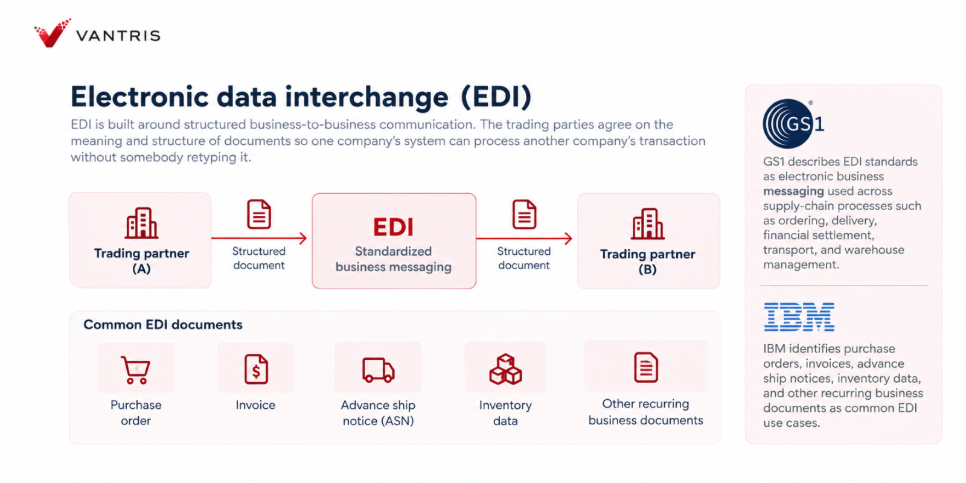
Electronic data interchange is built around structured business-to-business communication. The trading parties agree on the meaning and structure of documents so one company’s system can process another company’s transaction without somebody retyping it.
GS1 describes EDI standards as electronic business messaging used across supply-chain processes such as ordering, delivery, financial settlement, transport, and warehouse management.
IBM similarly identifies purchase orders, invoices, advance ship notices, inventory data, and other recurring business documents as common EDI use cases.
For a distributor selling to large retailers, manufacturers, marketplaces, or other customers with formal trading requirements, this standardization can be the point.
The customer may not be asking, “What integration method would you prefer?” The customer may be telling you how orders, acknowledgements, shipping notices, and invoices must be exchanged.
Where EDI fits well
- Major customers or retailers require standardized electronic documents such as purchase orders, acknowledgements, advance ship notices, or invoices.
- The business processes a high volume of repeat B2B documents with known trading partners.
- Several partners already use established EDI standards, making partner onboarding and compliance part of the operating model.
- The distributor needs formal acknowledgements, traceability, and document-level governance across partner transactions.
Where EDI becomes operationally difficult
Using the same EDI standard does not mean two trading partners will implement it the same way.
Required fields, codes, timing rules, business logic, and exception handling can still vary by partner. IBM notes that partner-specific data fields and formatting conventions still need to be aligned even when both sides use the same EDI standard.
EDI still requires partner mapping, testing, acknowledgements, failed-document handling, requirement changes, and translation into the ERP record
Someone still needs to own partner mapping, testing, acknowledgements, failed documents, requirement changes, and the translation between the external document and the ERP record.
For example, an incoming customer order may include the customer’s product number, ship-to code, unit of measure, requested delivery date, and pricing references. The ERP still needs to know what each of those values means internally.
EDI standardizes the message. It does not eliminate the need for clean master data and clear ownership.
What an API is designed to solve
An application programming interface lets software interact through a defined set of requests, responses, data structures, and actions.
Instead of exchanging a complete commercial document on a scheduled cycle, one application can ask another application for specific information or tell it to perform a defined action.
IBM describes APIs as rules and protocols that enable applications to exchange data, features, and functionality.
Acumatica’s 2026 R1 contract-based REST API, for example, can retrieve records, create or update records, and execute actions through defined endpoints using JSON representations.
For distributors, that makes APIs useful when the interaction is closely tied to an application workflow rather than a formal B2B document.
Where APIs fit well
- An ecommerce site, portal, or external application needs current inventory, pricing, order status, or shipment information.
- Orders need to move into ERP or another operational system as they happen, rather than waiting for a scheduled batch.
- The integration needs to support application workflows, including create, update, validate, and retrieve actions.
- The business benefits from event-driven or near real-time exchange between systems.
Where APIs become operationally difficult
An API can be flexible, but flexibility creates its own responsibilities. Authentication needs to be managed. Endpoints and versions need governance. The integration needs to handle timeouts, unavailable services, changed fields, rejected requests, duplicate messages, and responses that arrive differently from what the receiving system expects.
Low latency can also create dependency.
If a checkout process calls for another system before confirming inventory, what happens when that system is slow? If the ERP API is temporarily unavailable, does the order queue and retry, fail visibly, or disappear into a log nobody watches?
The faster the integration is expected to behave, the more important those operational decisions become.
What flat-file integration is designed to solve
Flat-file integration is the least glamorous of the three, which is partly why it gets dismissed too quickly.
The model is simple: one system creates a structured file; another receives it, maps the fields, validates the data, and imports the records. In production, that exchange is often automated and scheduled.
Acumatica 2026 R1 supports import and export scenarios that map ERP fields to external files or third-party sources, including CSV-based workflows and scheduled synchronization.
Flat files work well when a legacy system can reliably produce a scheduled export, when large reference datasets such as item masters or price lists move in batches, or when an existing partner file process already meets the business requirement.
The risk comes from operating a simple file process casually.
A production file process still needs clear answers: Did the file arrive? Was it processed once? What happens if one row fails? What if the format changes? Can the file be reprocessed safely? Who gets alerted when something goes wrong?
A file sitting quietly in an SFTP folder can create just as much business damage as a failed API call. It is simply less likely to complain loudly.
How timing changes the decision
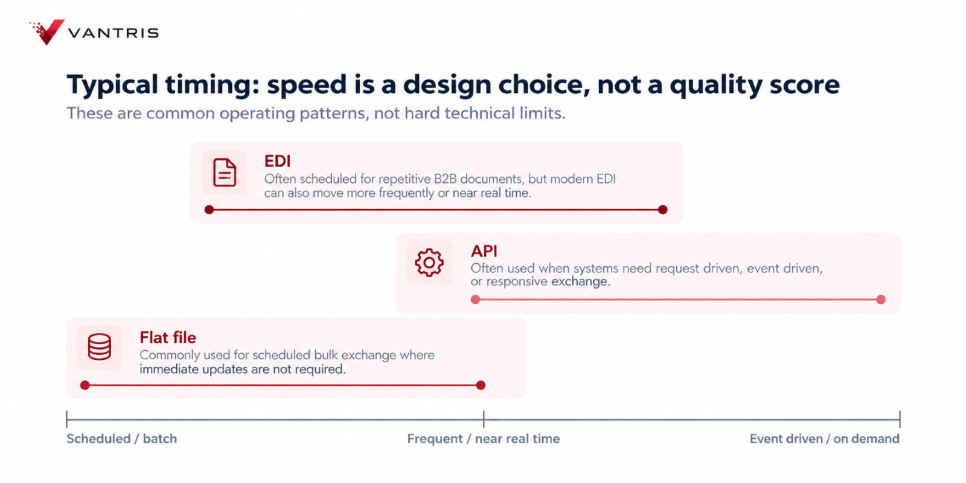
Figure 2. Typical operating cadence. EDI can range from scheduled exchange to more immediate delivery, APIs often support responsive interaction, and flat files are commonly batch-oriented.
Real-time is often assumed to be better.
For many processes, it is simply more expensive to design and support than the business requires.
If a customer is placing an ecommerce order and inventory needs to be checked before the order is accepted, waiting for tomorrow morning’s file is clearly a problem.
If a supplier sends a cost catalogue that changes once a month, building an event-driven API may not improve a single business decision.
Timing should therefore be expressed as a business requirement: seconds, minutes, hourly, daily, or on demand. Once that is clear, the integration design has something real to solve.
A few distributor scenarios make the tradeoffs clearer
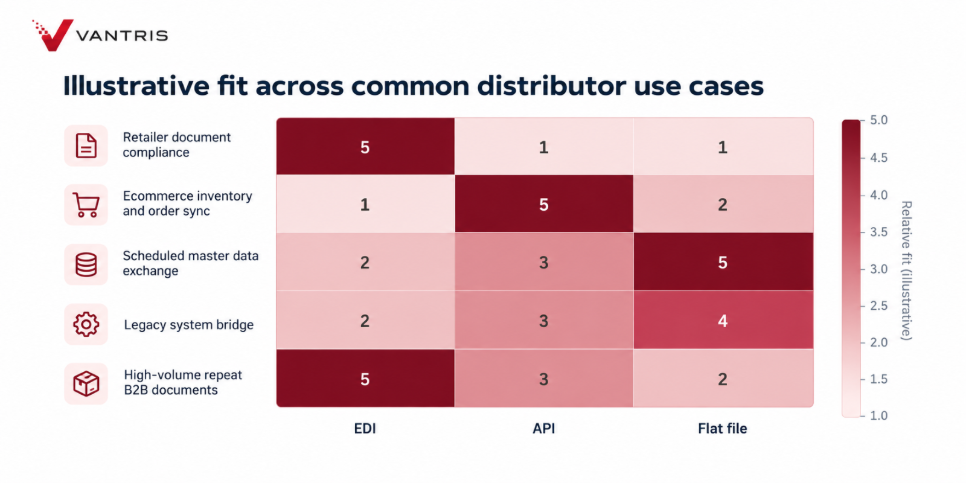
Chart 2. Illustrative fit across common distributor use cases. Higher scores indicate a stronger starting fit, not a mandatory choice.
| Business situation | Likely starting point | What still needs to be decided |
| A national retailer mandates electronic POs, acknowledgements, ASNs, and invoices. | EDI | Partner mapping, required fields, item and location cross-references, acknowledgements, exception handling, and ERP posting. |
| A Shopify or B2B commerce site needs inventory and order updates throughout the day. | API | System of record, availability definition, update timing, retries, order validation, and what happens during outages. |
| A legacy warehouse application exports transactions every night. | Flat file | File format, schedule, secure transfer, duplicate prevention, validation, error reporting, and reconciliation. |
| A large customer requires EDI, while the ecommerce channel uses API-based order flow. | Hybrid | The ERP data model must support both without creating different definitions of customer, item, inventory, or order status. |
| A 3PL can support either scheduled files or an API. | Depends on the process | Shipment volume, required timing, failure recovery, available IT support, and whether status needs to be queried on demand. |
“Modern” is not the same as “appropriate”
I would be cautious about replacing a stable EDI flow with an API simply because the API sounds more modern.
If a retailer requires standardized EDI documents, EDI is not a legacy nuisance. It is the agreed business language for that relationship.
The same is true of files. A well-controlled nightly file that meets the business requirement can be better than a real-time interface that adds cost, fragility, and support work without improving the decision
On the other hand, keeping a batch process because “that is how we have always done it” is not a strategy either. If sales, customers, or operations are making decisions from stale data, the timing model deserves to be challenged.
Choose the simplest integration that meets the operating requirement and can be monitored properly
The system of record matters more than the transport
Before connecting systems, decide which system owns each important piece of data. Integration does not create ownership. It only moves data between places.
| Data question | Example decision |
| Who owns the customer record? | ERP may own credit terms and accounting status while a CRM owns prospect activity. The integration needs a deliberate handoff. |
| Who owns the item and SKU definition? | ERP may be authoritative for internal item IDs while trading partners use their own item numbers that must be cross-referenced. |
| What does “available inventory” mean? | On hand, allocated, on order, in transit, damaged, and warehouse-specific quantities may need different treatment. |
| Who owns price? | Contract pricing, ecommerce pricing, customer-specific terms, and ERP price lists can conflict if ownership is unclear. |
| What creates the official order? | A web order, EDI document, or external marketplace event may become a sales order only after ERP validation. |
That distinction also matters for inventory visibility: an integration can move inventory data perfectly and still create bad decisions if each system means something different by ‘available
Mapping is where integrations become business processes
Every integration eventually must answer a mapping question: what does this value in System A mean in System B?
A customer may call an item ABC-123 while the distributor calls it 100045.
A trading partner may use one ship-to code while ERP stores another. A file may say “EA” while the ERP expects a different unit of measure code.
An API field called availableQuantity may not use the same availability calculation the warehouse team expects.
Those are not purely technical problems. They are definitions of how the business operates.
Acumatica’s import scenario documentation makes this visible in a practical way: integrations map source fields to target ERP fields, including key fields that identify records.
Its export scenarios similarly map ERP source data to fields in an external file or third-party target.
Good integration design therefore needs somebody who understands the transaction, not only somebody who can connect endpoints.
Monitoring and exception handling are part of the integration
A connection is not finished when the first test message succeeds.
| Integration pattern | Questions the operating team should be able to answer |
| EDI | Was the document sent or received? Was it accepted? Did mapping fail? Is an acknowledgement missing? Which partner rule caused the exception? |
| API | Did the request succeed? If not, was it retried safely? Was authentication valid? Did the endpoint return a business error or a technical error? |
| Flat file | Did the expected file arrive? Was it processed once? Did every row load? Where are rejected rows? Can the batch be reconciled to the source? |
If nobody can answer those questions without asking a developer to search a log, the integration may be technically connected but operationally weak.
How ERP fits into the integration architecture
ERP should be treated as part of the integration architecture, not simply the destination database.
In Acumatica 2026 R1, the contract-based REST API provides defined endpoints for working with ERP entities and actions in JSON. Import and export scenarios provide another integration path for mapped file or third-party data, including periodic full or incremental processing.
EDI is a separate business document layer. A distributor may use an EDI platform, middleware provider, or another integration service to manage partner standards and translations, then connect that process into ERP.
The important design question is where each responsibility belongs: trading-partner management, translation, business validation, ERP posting, monitoring, and exception ownership
That distinction matters during ERP modernization. Replacing the ERP does not automatically mean every integration should be rebuilt using the same technology. Some should be redesigned. Some should be kept. Some should disappear because the underlying process no longer makes sense.
The same principle applies to Purchase Order vs. Replenishment Planning. Once the business decision and system responsibilities are clear, the transaction is easier to design
A practical integration review before you choose EDI, API, or files
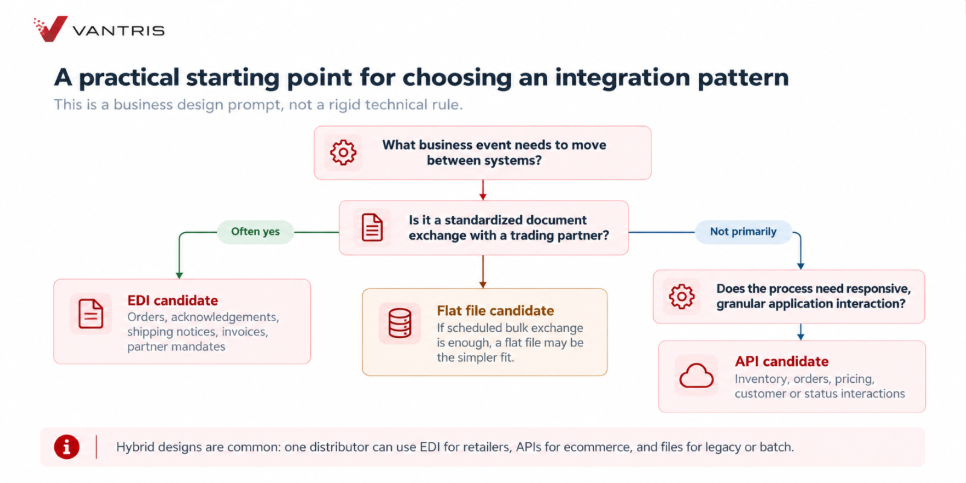
Figure 3. A starting point for the integration conversation. Partner standards, timing, data volume, and application behaviour should drive the choice, and hybrid designs are normal.
| Question to answer | Why it matters |
| What business event are we moving? | An order, inventory update, invoice, shipment status, price file, and customer record have different timing and control requirements. |
| Who are the two parties or systems? | Internal application integration and formal trading-partner exchange are different operating relationships. |
| How quickly must the data arrive? | The real requirement may be seconds, every fifteen minutes, hourly, or once per day. |
| How much data moves at once? | Small granular interactions and large bulk extracts behave differently. |
| Is there an established partner standard or mandate? | A required EDI document can remove much of the technology-choice debate. |
| Which system owns each field? | Without ownership, integration can spread conflicting data faster. |
| How will mapping changes be governed? | Item IDs, locations, units, codes, and required fields change over time. |
| How will failures be detected and retried? | Silent failure is an operating risk regardless of the technology. |
| Who supports the integration after go-live? | The design must match the team that will monitor, troubleshoot, and change it. |
Choose the operating model before the acronym
EDI, APIs, and flat files can all work well. They can also all be implemented badly.
EDI fits recurring, standardized trading partner documents. APIs fit flexible, responsive system-to-system interaction. Flat files fit scheduled bulk exchange when the process is controlled properly.
The mistake is choosing based on what sounds most modern.
Start with the business event. Define the source of truth. Decide how quickly the data needs to move. Then determine how failures will be detected, corrected, and replayed.
For many distributors, the right answer is a mix of integration methods rather than one standard approach.
The goal is not to make every connection look the same. It is to make each one reliable, understandable, and appropriate for the process it supports.
If you are reviewing ERP integrations, start by mapping the business event, source of truth, timing requirement, and failure path. Vantris can then help identify which connections fit EDI, APIs, file-based exchange, or a mix of the three
About Harvey Wang
Harvey Wang is President of Vantris. He brings more than 15 years of experience across ERP, professional services, investment management, and executive recruitment. Before Vantris, he led growth in the Sage ERP ecosystem and worked closely with businesses evaluating technology, operations, and investment decisions. Across those roles, his focus has been consistent: turn complex information into clear business decisions.
At Vantris, Harvey leads growth, client strategy, partnerships, and go-to-market. His ERP work starts with how the business makes money, where performance is being held back, and what needs to improve before technology enters the discussion. He focuses on separating genuinely unique requirements from habits inherited from the old system